
Mark answer sheets on screen
with full annotation control.
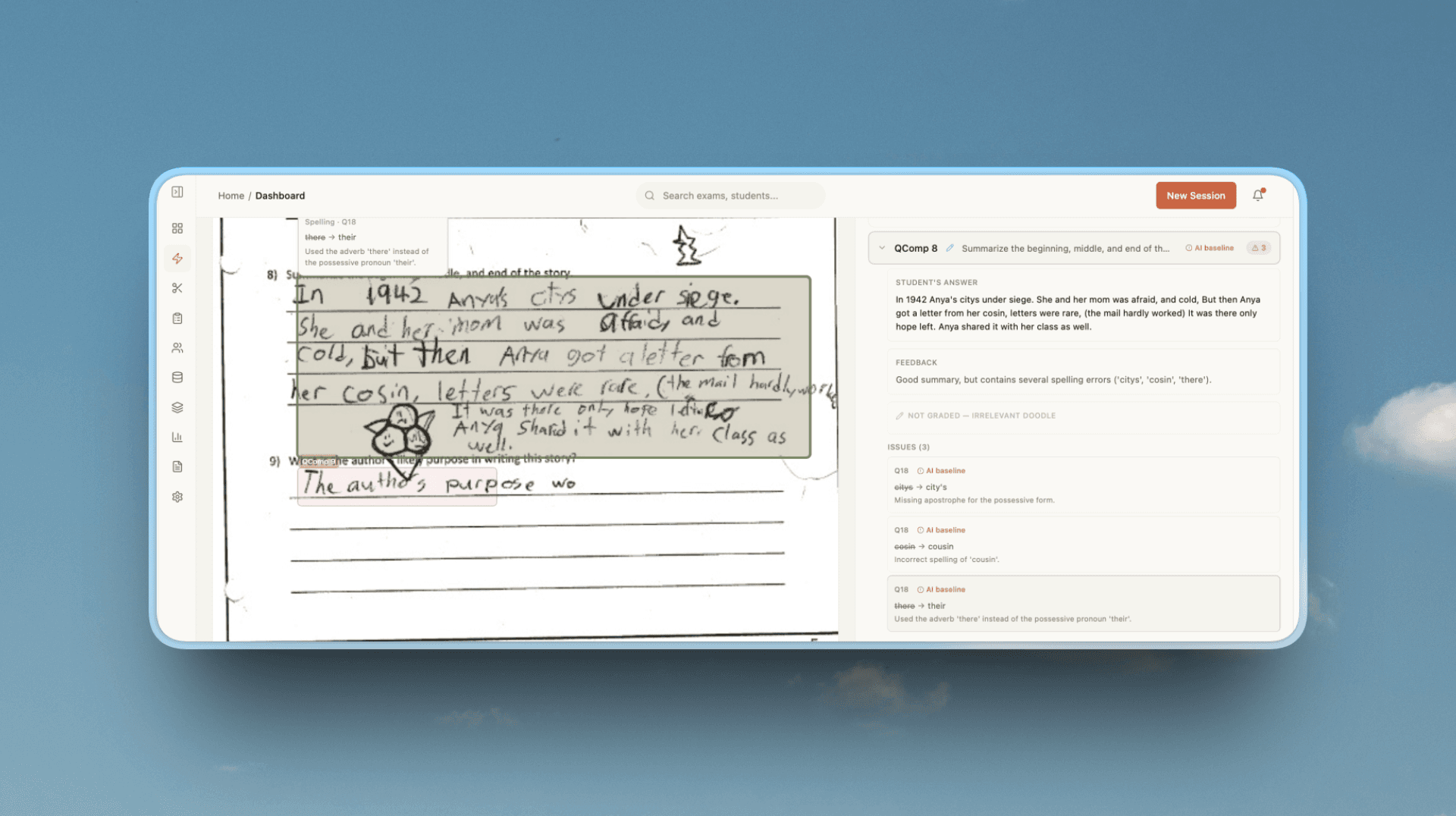
Stamps, highlights, sticky notes, inline comments. Every mark documented. Every student gets transparent feedback.
Place stamps, draw highlights, add typed comments directly on scanned scripts. Every mark saved in real time.
All annotations auto-saved
Marking Queue
Moderation
Smart Data Mapping
Automated Extraction
Instantly converts scanned exam papers into structured digital data. Our AI automatically identifies and maps student information, question numbers, and answer regions. No manual setup required.
Multilingual OCR
30+ Languages
Arabic, Chinese, German & more
AI Moderation
Compare & Validate
Complete control over results
Smart Automation
Understands Every Answer
Intelligently processes diverse answer formats from handwritten essays to diagrams and mathematical equations. Adapts to any exam layout while maintaining accuracy across question types.


One Platform, Every Format
From handwritten essays to digital quizzes, GradeLab handles it all with the same precision and speed.
Trusted by leading institutions

.png&w=640&q=75)





One Platform. Every Marker. Every Script.
From bulk script upload to quality-assured results release, GradeLab OSM covers every step of the on-screen marking workflow—fast, consistent, and fully auditable.
See GradeLab in action
Watch how AI grading and online assessment work end-to-end, from upload to results.
Also explore AI grading for automated scoring or digital grading for end-to-end online exams.
Powering Assessment for
Governments, institutions, and AI ecosystems worldwide. Delivering secure, scalable, and accurate handwritten assessment solutions.

Government-Certified AI Handwritten Evaluation
Official assessment workflows for certified exam bodies and large-scale handwritten examinations.
.30c80c0c.png&w=1920&q=75)
Enterprise Public Sector AI Grading Systems
Enterprise-grade AI grading deployed for national-level academic and workforce assessments.
Custom AI Grading & OCR Infrastructure
Fine-tuned OCR and grading models built specifically for real-world exam handwriting.
On-Screen Marking With Full Annotation Control
Give every marker a complete toolkit—stamps, highlights, sticky notes, and inline comments—so every decision is documented and every student gets transparent feedback.
Annotation Toolkit
Place stamps, draw freehand highlights, and add typed comments directly on scanned answer scripts—every mark is saved in real time.
Sticky Notes & Inline Comments
Leave targeted notes on specific paragraphs or diagrams so students know exactly what earned or lost marks.
Customisable Marking Stamps
Build a library of institution-specific stamps—tick, cross, part-mark, or custom symbols—for fast, consistent marking across all markers.
Question Navigation Panel
Jump between questions instantly with a structured side panel showing marks awarded, maximum marks, and completion status for each item.
Answer Feedback Summary
Review all marker comments, scores, and annotated highlights for every question on a single feedback screen before finalising the grade.
Quality Assurance & Moderation
Supervisor dashboards surface outlier scores and flag double-marking discrepancies automatically, keeping results fair and audit-ready.
How It Works
On-Screen Marking in Four Simple Steps
1
Upload & Assign Scripts
Bulk-upload scanned answer booklets as PDFs or images. The system automatically sorts scripts, assigns them to markers, and tracks progress in a central queue.
2
Annotate & Mark On Screen
Use stamps, freehand highlights, and inline comments to mark each answer. Navigate question by question with the marking scheme displayed alongside the student script.
3
Review All Feedback & Scores
Open the answer feedback panel to see every marker comment, score, and annotation for all questions. Supervisors check for outliers and approve marks before release.
4
Finalise & Export Results
Approve grades, generate per-student feedback reports, and push results to your LMS or student portal. A full audit trail is available for every decision made.
On-Screen Marking FAQ
What is on-screen marking (OSM)?
On-screen marking is a digital process where examiners mark scanned student answer scripts on a computer screen instead of working with physical papers. It centralizes all answer booklets, provides annotation tools, and lets markers grade question by question for greater consistency and speed.
How do annotation tools work in on-screen marking?
Markers can place stamps, draw highlights, add sticky notes, and type comments directly on the scanned script. Every annotation is saved in real time and linked to the specific answer, giving students a clear record of exactly where marks were awarded or deducted.
Can multiple markers work on the same exam paper?
Yes. The platform supports double marking and moderation workflows. Different markers are automatically assigned separate questions or scripts, and a senior moderator can review any discrepancies before results are finalized.
How is marking consistency maintained across markers?
The system uses standardization scripts and live marking statistics to flag outlier scores. Markers can view the official marking scheme side by side with each answer, and supervisor dashboards track individual marker behaviour throughout the session.
Can markers leave written feedback for students?
Yes. Each answer has a dedicated feedback panel where markers can write detailed comments. These comments are stored against the question and are visible to students and teachers once results are released.
What file formats are supported for uploading answer scripts?
The platform accepts PDF and common image formats (JPEG, PNG, TIFF) produced by standard office scanners or mobile scanning apps. Bulk uploads are supported so entire exam batches can be ingested in one go.
How does double marking work in the OSM system?
When double marking is enabled, two independent markers score the same script without seeing each other's marks. If their scores differ by more than a set tolerance, the paper is automatically escalated to a senior examiner for a casting vote.
Can I set marking quotas or deadlines for each marker?
Yes. Supervisors can assign a specific number of scripts to each marker, set completion deadlines, and monitor progress in real time through a central dashboard. Automated reminders help keep the marking session on schedule.